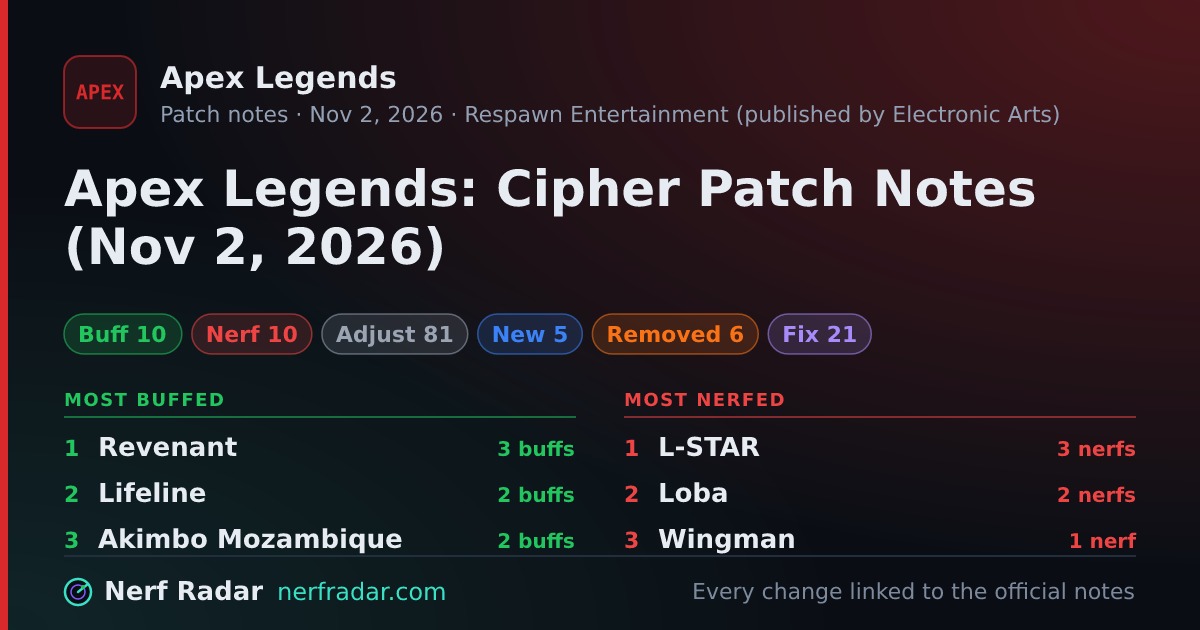
TL;DRApex Legends: Cipher adds the Akimbo Wingman, airdropped Strongholds and Ranked Legend bans in Diamond+. It reworks Crypto, buffs Lifeline and Revenant, nerfs Loba, L-STAR and Prowler, and brings back the Hemlok Burst AR.
What it means
Close to even: 10 buffs and 10 nerfs, so no clear lean either way.
Bigger than usual: 133 changes vs a median of 3 across the other 14 Apex Legends updates tracked here.
Most changed: buffed Revenant (3), Akimbo Mozambique (2), Lifeline (2); nerfed L-STAR (3), Loba (2).
Largest number change: L-STAR: Base stockpile size, −48% (a nerf). See it
Reversals: Loba (buffed in Apex Legends: Marked Patch Notes (Aug 3, 2026), nerfed here).
Who this matters to
Ranked players
Diamond+ matches add Legend bans, and entry cost now adjusts when your squad is far above or below the lobby.
Crypto, Lifeline and Revenant mains
Crypto's drone gets a battery and a new marking system, while Lifeline and Revenant get shorter cooldowns and new Upgrades.
Prowler and L-STAR users
Prowler gets more recoil and loses Selectfire, and the L-STAR returns to the floor with lower damage.
All 133 changes
Wingman
First change to Wingman in the 15 Apex Legends updates tracked here.
Adjust
The Wingman now uses Heavy Ammo and Heavy Magazines instead of Sniper Ammo, and spawns on Heavy Ammo Arsenals.
Official note
Ammo type changed from Sniper Ammo to Heavy Ammo
Now takes Heavy Magazines instead of Sniper Magazines
Now spawns on Heavy Ammo Arsenals instead of Sniper Ammo Arsenals
Nerf
Base damage
Wingman's base damage decreases from 50 to 45. −10%
New Akimbo Wingman: loot a second Wingman to automatically dual-wield them.
Official note
Loot a second Wingman to automatically enter Akimbo
Adjust
In Akimbo Mode, the Wingman's headshot damage is 56 because of a lower headshot multiplier.
Official note
Headshot damage: 56
Adjust
Akimbo Mode slightly increases the Wingman's rate of fire.
Official note
Slightly increases rate of fire
Adjust
Akimbo Mode increases the Wingman's reload time.
Official note
Increases reload time
Adjust
Akimbo Mode increases the Wingman's recoil.
Official note
Increases recoil
Adjust
Akimbo Mode doubles the Wingman's magazine size.
Official note
Magazine size is doubled
Adjust
The Akimbo Wingman fires each gun one after the other in a quick burst, and holding the trigger keeps releasing bursts.
Official note
Firing the Akimbo Wingman will cause each gun to fire one after the other, in a quick burst
Holding down the trigger releases subsequent bursts
Strongholds
New
New Strongholds airdrop near the mid game: 2 Care Packages drop as Round 1 closes, then 1 Care Package and 1 Stronghold as Round 2 closes.
Official note
Updated Airdrop timing to accommodate Strongholds
2x Care Packages drop during Round 1 closing
1x Care Package drop during Round 2 closing
1x Stronghold drop during Round 2 closing
Adjust
Strongholds crush and kill players and objects underneath them when they land.
Official note
Strongholds crush (and KILL) players and objects underneath them on landing
Adjust
Strongholds drop dynamic cover on landing: up to 4 indestructible barriers and 2 Hardlight frames if there is room.
Official note
Strongholds drop Dynamic cover upon landing
If there is enough space, Strongholds will deploy up to 4 indestructible barriers, and 2 Hardlight frames
Adjust
Strongholds cannot be accessed or entered until they are captured.
Official note
Be accessed or entered until captured
Adjust
Loba cannot steal from a Stronghold until it is captured.
Official note
Be stolen from by Loba until captured
Adjust
Alter cannot breach a Stronghold until it is captured.
Official note
Be breached by Alter until captured
Adjust
Strongholds are captured by controlling the zone around them. Progress only moves when one team is alive in the zone, is shared, never decays, and is faster with more teammates.
Official note
Strongholds are Captured by controlling the Zone surrounding the structure
Capture Progress is made whenever there is only 1 team alive in the Capture Zone
Capture is Contested when more than one team is present in the Zone
Capture Progress is globally shared and cannot decay
Capture Progress is faster when multiple teammates are present
The capturing team is whichever team is in the Zone when Capture Progress reaches 100%
Adjust
When a Stronghold is captured, its doors and roof hatch open.
Official note
The Stronghold's doors and roof hatch will open
Adjust
Capturing a Stronghold gives each living member of the capturing team a Level Up, and its loot is a mix of rare items including a Care Package weapon.
Official note
The Stronghold awards a Level Up to each living member of the capturing team
First change to Crypto in the 15 Apex Legends updates tracked here.
Adjust
Passive
Ally.MoveTo() (Speed Boost towards Teammates) Upgrade has now been integrated into the base kit.
Nerf
Passive
Crypto's speed boost toward teammates is slightly reduced now that it is part of his base kit.
Official note
The speed boost has been slightly reduced
Adjust
Tactical
Crypto's drone now has a battery system instead of lasting for ever.
Adjust
Tactical
With the battery, the drone has a limited time of 25s to perform its actions before being recalled.
Adjust
Tactical
After recalling, the drone can be redeployed without waiting for a cooldown.
Adjust
Tactical
Recall time is 6s.
Adjust
Tactical
Increased handling and speed while in the drone.
Adjust
Tactical
Enemies within line of sight of the drone can be scanned and marked; the marking ability has a 4s cooldown.
Adjust
Tactical
Enemies get marked with an icon that will allow you to track enemies even if the drone is recalled or destroyed.
Official note
You cannot re-apply the mark to an enemy that is already marked
Enemies are marked for 8s
Adjust
Tactical
The base scan zone has been updated to 360 instead of just camera view, it also no longer scans lootbins and doors.
Adjust
Tactical
While in drone mode you can press the shoot button to manually fire the mark.
Adjust
Tactical
Sped up transition time when entering the drone.
Adjust
Ultimate
While piloting the drone, Crypto can still trigger the EMP as before.
Official note
Crypto can trigger the EMP similar to the previous version
Adjust
Ultimate
While piloting, the EMP now uses the Ultimate button (Y on console), because the Shoot button marks enemies.
Official note
The player can press the Ultimate button on PC and the Y button on Console
The Shoot button is now used for marking enemies
Adjust
Ultimate
Out of pilot mode, the EMP triggers on the deployed drone.
Official note
The EMP triggers on the drone that has been deployed
Adjust
Ultimate
As long as Crypto has an available drone that isn't destroyed and isn't out in the world he can deploy the drone and activate the EMP by triggering his Ultimate.
Adjust
Ultimate
The drone that is deployed for the Ultimate will trigger the EMP after a short delay.
Adjust
Ultimate
If the EMP has line of sight to an enemy, it will deal full shield damage and a heavier slow; If the EMP does not have line of sight, it will deal 50 damage and a lighter slow.
Adjust
Ultimate
Crypto will not damage himself with his own EMP.
Lifeline
First change to Lifeline in the 15 Apex Legends updates tracked here.
Buff
Passive
D.O.C. now heals Lifeline while she is gliding.
Buff
Tactical · Tactical cooldown
Tactical cooldown on Lifeline's Tactical decreases from 25s to 15s. −40%
Official note
Reduced Tactical cooldown from 25s to 15s
Adjust
Upgrades
LVL 2 — BattPack (+1 battery slots) replaced by Enhanced Radio (moved from LVL3) (Increased assign distance).
LVL 3 — Enhanced Radio (moved to LVL2) (Increased assign distance) is replaced by Ultimate Cooldown (60 second ultimate cooldown reduction).
Revenant
First change to Revenant in the 15 Apex Legends updates tracked here.
Buff
Tactical · Tactical cooldown
Tactical cooldown on Revenant's Tactical decreases from 20s to 15s. −25%
Official note
Reduced Tactical cooldown from 20s to 15s
Buff
Tactical
Revenant's Tactical charges faster.
Official note
Sped up Tactical charge time
Buff
Ultimate · Ultimate cooldown
Ultimate cooldown on Revenant's Ultimate decreases from 180s to 150s. −17%
Official note
Reduced Ultimate cooldown from 180s to 150s
Adjust
Upgrades
LVL 2 — Ultimate Cooldown (Ultimate cooldown reduced by 30s) replaced by Ever Lasting (10s Ult extension time on knock).
Adjust
Upgrades
LVL 3 — Tactical Cooldown (Tactical cooldown reduced by 5s) replaced by Silence (Landing from a Tactical leap releases an AOE pulse that silences enemies).
Adjust
Upgrades
LVL 3 — Agile Assassin (Tactical attack and charge time faster) replaced by No Escape (Tactical refreshes when an enemy is marked by Passive).
The Corrupted Rapid Sniper Stock's rate of fire multiplier drops from 1.2x to 1.1x on the G7 Scout, Longbow DMR and Triple Take.
Official note
Reduced rate of fire multiplier from 1.2x to 1.1x on:
G7 Scout
Longbow DMR
Triple Take
EVA-8 Auto
Removed
The EVA-8 Auto loses the Double Tap Trigger Hop-Up.
Official note
Removed from: EVA-8 Auto
New
The EVA-8 Auto gets the Disruptor Rounds Hop-Up (375 points to unlock).
Official note
Added to: EVA-8 Auto [375 points to unlock]
Prowler Burst PDW
Removed
The Prowler Burst PDW loses the Selectfire Receiver Hop-Up.
Official note
Removed from: Prowler Burst PDW
E-District Night Adjustments
Adjust
Balanced Silhouette Contrast: Reduced the extreme difference between direct and ambient light levels, lifting deep shadows to dramatically improve enemy player visibility in low-light zones.
Adjust
Motivated Light Sources: Added a significant number of localized, practical light fixtures to ensure the map feels naturally illuminated by the environment itself.
Adjust
Grounding & Shadows: Substantially increased the technical budget for shadow-casting lights, grounding characters and environment structures far more realistically.
Adjust
Micro-Contrast & Mood: Reworked the color-correction pass to sharpen micro-contrast, maintaining the city's rich cyberpunk atmosphere without turning dark areas into blind spots.
Adjust
Visual Noise Reduction: Streamlined building and advertisement panel colouration to clear up high-frequency visual noise, letting player silhouettes pop against the city backdrop.
Global Rendering & Readability Updates
Adjust
Environmental Illumination: Applied a comprehensive lighting and material pass to world geometry and signage, establishing unified visual standards across all maps.
Adjust
Luminance Standardization: Standardized world lighting values to guarantee predictable character contrast and consistent material behavior across different environments.
Adjust
Fog in active gameplay areas is reworked to keep important sightlines clear and improve depth perception.
Official note
Atmospheric Fog Overhaul: Re-architected our fog systems within active gameplay spaces to preserve critical sightlines while sharpening overall depth perception
Adjust
Auto-Exposure Adaptation: Fine-tuned global color grading and slowed down auto-exposure adaptation speeds, limiting drastic brightness shifts and reducing eye strain during high-intensity fights.
Adjust
Performance Optimization: Rebalanced localized lighting grids to optimize GPU performance and improve target readability in high-frequency visual areas.
Wildcard
Adjust
Wild Cards are now granted to players at the beginning of Rounds 1, 2, and 3 via a selection UI at the top of the player's HUD.
Challenger Match — discounts entry cost by 30% when your Squad Tier is 2+ tiers below the Lobby Tier.
Adjust
Goliath Match — increases entry cost by 50% when your Squad Tier is 2+ tiers above the Lobby Tier.
Adjust
In Ranked, if a teammate never connects, your Squad Tier drops by one full tier.
Official note
If a teammate never connects, your Squad Tier is decreased by one full tier.
Adjust
Displays current Entry Cost.
Adjust
Displays a small pip for your Squad's exact position in the Match Distribution.
Adjust
Now lists your entire team even before individual members connect.
Adjust
Added Match Type information.
Adjust
Shows Ranked information about your squad and the match.
Adjust
Highlights relevant RP goals — covering your entry cost and promoting to the next division.
Official note
Includes replacing your lowest ladder score and exiting demotion protection, when relevant
Adjust
Displays RP scoring rules.
Adjust
The inventory button still pulls up the "Inventory" tab.
Adjust
The Ranked lobby now shows your Matchmaking Tier, the rank the game is trying to match you at.
Official note
Added label in the lobby for your Matchmaking Tier, the rank at which we are attempting to matchmake you
Adjust
The kill feed now shows the RP earned on each kill and how much placement RP you gain when a squad is fully eliminated.
Official note
Added RP information to the Obituaries/Kill feed
Showing the amount of RP earned on each kill
Added a new message when a squad is fully eliminated, including how much Placement RP you gain
Adjust
The in-game Net RP display is red when your RP is negative and white when positive, with a small animation and sound when you reach positive RP.
Official note
Updated the in-game Net RP UI to be red if you have negative RP, white if you have positive RP
Added a minor animation and a light audio effect when you reach positive RP
Bug Fixes
Fix
Fixed an issue where players could perform bunny hops during the Death Box respawn interaction, allowing movement behavior that is not intended while the respawn process is in progress.
Mirage
Fix
Fixed a bug where Mirage's decoys remain floating in place when deployed during skydiving.
Crypto can no longer use Weapons in the Olympus Boxing Ring.
Caustic
Fix
Caustic's Nox Gas Traps are now able to be placed in Somers University properly.
Ballistic
Fix
Fixed Ballistic's Sling weapon keeping the Locked Hop-Up bonus after Tempest expired when the Hop-Up was inactive before Tempest.
Official note
Fix where after Ballistic's Tempest expires, the Sling weapon continued to benefit from the Locked Hop-Up even though the Hop-Up was inactive before Tempest was activated
Mad Maggie
Fix
Fixed a bug where Mad Maggie did not receive the speed boost effect from Corrupted Agile Stock.
Alter
Fix
Various minor Alter bug fixes.
Olympus
Fix
Fixed an issue at the center of Estates where players couldn't climb up the edges of the second floor building to reach the top level.
Official note
Olympus: Fixed an issue at the center of Estates where players couldn't climb up the edges of the second floor building to reach the top level
New Legend bans in Diamond+ Ranked: each player can request one Legend to ban, and a Legend's chance of being banned matches its share of the requests.
Official note
This season introduces a new system that allows players to select Legends they would like to see banned at the start of each Diamond+ match.
Structured by Nerf Radar from the official notes (parsed automatically and reviewed by hand). EA's official Apex Legends patch notes as fetched; legend and weapon labels come from the numbers in each line, and lines without before and after values are labeled adjust. Source: ea.com · fetched Nov 2, 2026.